Showing posts with label Computer. Show all posts

Sunday, 21 June 2015

Chromebit - Your computer is in your pocket

Google has launched Chrombit. This will be the 4th Generation's exact invention and which is going to change the level and method of Technology in the coming years.


Chromebit is USB kind of device which works like a computer. You can turn any screen into a computer by using this Chromebit. After connecting the chromebit to your screen (Smartphone, TV, LED or LCD Screen) by using cable or by direct, you can connect the keyboard and mouse and start using your Chrome OS based Computer.

Wednesday, 10 June 2015

How to delete Youtube watch history?

You can delete Youtube watch history either one by one or by all in a same time.
1. Open youtube

2. Click history as shown in the below image.
                                               
3.Delete the entire history by clicking Clear all watch history or one by one as shown below.


How to boot into Safe Mode in Dell Server ?

Method : 1
While booting the Dell server, continuously tap F8 key to boot for safe mode or Directory Services Restore Mode. And you can use the following keys accordingly.
KEYS     ACTION
F2           - Setup
F10         - Utility Mode
F8           - Safe Mode / DSRM / Last Known Good Configuration
F11         - Boot Menu
F12         - PXE Boot

Method : 2
Boot the server in normal method.
Type msconfig and select boot.in , there you can click Safe Mode.


Wednesday, 27 May 2015

How to Add or Delete a user account in Windows 7?

Right click on My Computer and then click Manage.

Now Computer Management screen will appear.  In Computer Management just click Local Users and Groups.

Under Users right click on the blank area as shown in the below image, now you will get options for creating a new user account.


To delete or reset password for the particular account , select the desired account and right click ,now you can see the options as show in the below image.


Post your questions and feedback on comments.

Sunday, 2 February 2014

The 123 Most useful websites on the internet


1. Hubspot - Title generator
2. Way2sms - free SMS service
3. IMDB- Internet Movie Data Base
4. Pixlr - A free online photo editor
5. Mixlr - broadcast and listen audio over web
6. Ustream - broadcast live or recorded video over internet
7. Blogger - creat free blogs
8. ZOHO - cloud based apps integration
9. Youtube - Movies - watch free online movies
10. Miniclips - play free games online
11. Peter Answers - virtual tarot for fun
12. PDFonline - covert Pdf to Word online
13. Ezyzip - Zip and unzip files online
14. Labnol - a popular technology blog
15. Indiatrace - trace mobile number location
16. VideoEditor - online youtube video editor
17. Stupflix - online movie maker using photos and videos
18. Slideshare - a platform to view and share presentations online
19. Filehippo - free essential software download in easy method
20. Text2speech -  free online text to speech converter and download as MP3
21. Railradar - find out the current location of a train in google maps 
22. Friendstosupport - Find Blood Donors
23. EbizMBA - The 15 most popular -------- website
24. Foxyutils - Merge multiple PDF documents into one easily
25. DateFLM - A free tech site
26. Flash Driving Game - A flash Car Driving Game online
27. Engadget - A completed gadget guide
28. Addiction Games - Online gaming website
29. Filmsite - A website for films history and milestones, to know the movies to watch
30. SoundCloud - A large sound (Audin & Music) streaming website
31.Webdesign - A learning portal for designing
32.PdfEscape - Edit Pdf files online
33.FaxZero - Online fax service
34.Chipin - Raise funds online for trust or for any other cause
35.Aviary - Online audio editor & remix tool
36.Scribblemaps - Online website to create custom google map
37.Fiverr - Hire anybody or freelancer to do your work only for 5$
38.Namemytune - To find a name of a song
39.Nammatalk - A regional entertainment blog - Now in Tamil !!!
40.Petri - IT Knowledge-base
41.Omnisecu - A system admin tutorial for beginners
42.Filehorse - Free software download
43.Yandex - An alternative search engine for Google
44.Kibase - You can download YouTube videos, Text Encryptor & Kids Dictionary & etc....
45.WindowsClub  - Windows knowledge and technical info sharing site
46.Quirktools - Preview your screen in various resolution and devices
47. Vista Print - Design and order print online for Calendar, Shirts, T- Shirts, Caps and etc..
48. W3scools - A place where you can learn multiple scripts.
49. PDFtoWord - Convert documents from PDF to Word online.
50. Doc2Pdf - Convert any documents  to PDF online.
51. Keepvid - Download videso from most streaming websites
52. Networkadmin - Network Administration knowledge base
53. Correctcare - FTP site for most useful softwares
54. Whatthefont - it tells you the font from a image
55. Prezi -  A place where you can create stunning presentations
56. Calculator - An extraordinary online calculator which calculates anything to anything
57. Zerodollarmovie - Free full length movies on Youtube - easy to find, category wise
58. Movieplex - Full length bollywood movies online - Yahoo
59. Gotfreefax - A free online fax service
60. Greatfirewall - To check the availability of a website inside China
61. Magazinedownload - Download ebooks and magazines for free
62. BugMeNot - Generates user name and password for access websites
63. Archive - Watch and listen old radio and movies online for free
64. Seeklogo - Download free vector logos for your business
65. Routexl - A road route optimizer for multiple stops
66. Picasion - Create animated avatar and GIF online for free
67. Google Newspaper - An online archive of newspaper
68. LookupWarranty - Find warranty details for Laptop, Desktop & printer for most of the brands
69. Viki - Watch movies online for free
70. AndroidApp4PC - Download andriod apps for PC.
71. Secretly Meet - Creates a temporary website which become unavailable once the browser is closed
72. FilesToFriends - Fast and easy way to transfer large files
73. PasteToGrid - Free Photo collage online
74. ZinePal - Create eBooks from your blog post and websites in minutes
75. Interplast - Avail free plastic surgery service
76. Flashissue - Create stunning newsletters in Gmail and track the performance for free
77. LifeHacker - Tips, Tricks, Hacks and downloads
78. Imgur - Funny and most trending images
79. Alexa - A site where we can find commercial web traffic data.
80. Wayback Machine - Number of times website viewed in a calendar
82. Websiteoutlook - Find a websites revenue details for free
83. Ping.php - Check website availability in various countries in a single click
84. Oldversion - Download old version of a software
85. Ninite - Download many software in a single download
86. Woorank - A website optimizer
87. AccountKiller - Instead of disabling delete the entire account of any social media
89. Gutenberg - free e-book
90. Imgur - The most viral images
91. Dateflm - A free website for tech , events and how to


Will Continue......

Please post your comments to update this list.

For any doubts you can post your question. Our team will answer for your questions shortly

Friday, 10 January 2014

How to know who visited my Facebook profile?

Like Orkut , Facebook does not has the feature to check whoever visited your profile recently. So, to check visitors, IT - Pros found so many ways. Here, we would like to discuss about the most useful and easy method.

Step : 1

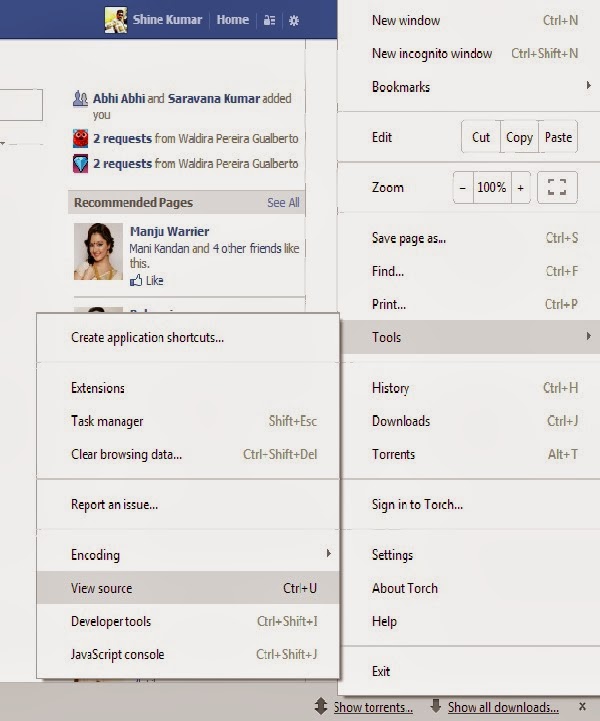
Log in to your facebook account. And navigate to source code by clicking Settings - Tools - View Source as shown in the  image or in keyboard type Ctrl + U for most browsers.


Step - 2

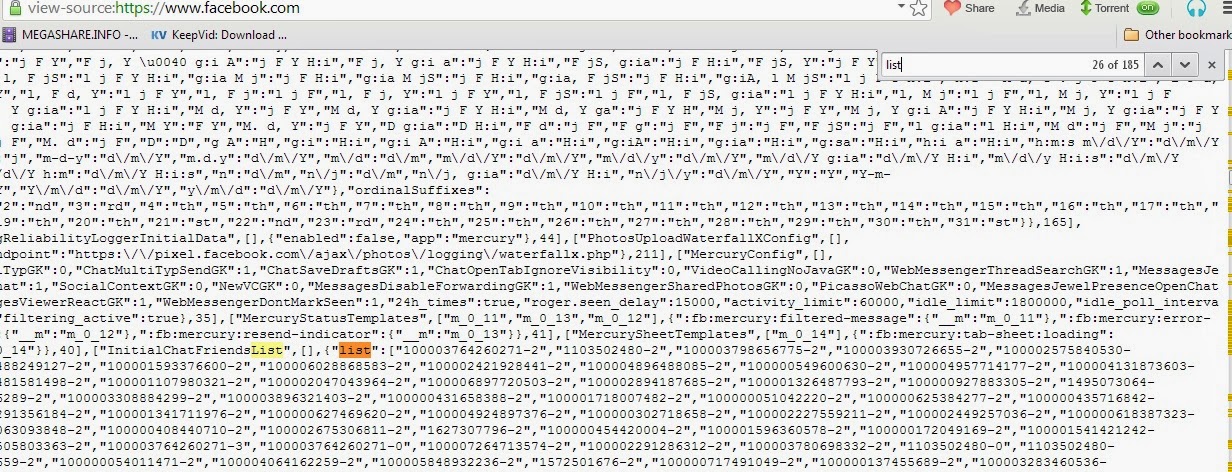
In the Source Code page open search box by using Ctrl + F and search for list. While searching you will see some random numbers as shown in the figure. Now only copy the random number which is inside the bracket and paste it after www.facebook.com in a new tab.


For example www.facebook.com/2376805346233908 - this will show the profile page of the user who visited your profile recently.  

Saturday, 5 October 2013

How to Edit Videos online?


By using Youtube's default video editor we can Combine, Rotate, Trim, Add text effect, Add Music, Insert transitions & Stabilize clips.

Here is the link - Youtube Video Editor

Thursday, 26 September 2013

Will Chrome OS beat Windows?

Chrome Operating System is a Linux based OS, and can be loaded to Laptops, Desktops and Mobile devices. And Chrome OS is very faster which is owned by the internet giant Google.

But in Chromes OS it is impossible to edit the documents which are created on Windows platform.  And viewing the documents also is becoming a big issue on Chrome OS. To view documents which are saved can be done by after installing Chrome Office Viewer. To overcome this issue Google has planned to develop Quick Office which will works better like MS Office. And the another major issue is in Chrome Based System accessing network drives and files is impossible. We can only access Google drives.

And installing Photoshop, Auto CAD and etc is not possible in Chrome OS. We can only install the applications which are available in Google Play as of right now. And Chrome OS is a free operating system.
Some default features in Chrome OS is we can perform Remote Desktop over internet (with Hangout).

So as of right now there is no chance to beat Windows by Chrome.


Tuesday, 20 August 2013

How to Enable or Disable desktop notification of Gmail in Chrome Browser?

In Chrome browser you can enable or disable desktop notifications by navigating as below mentioned,

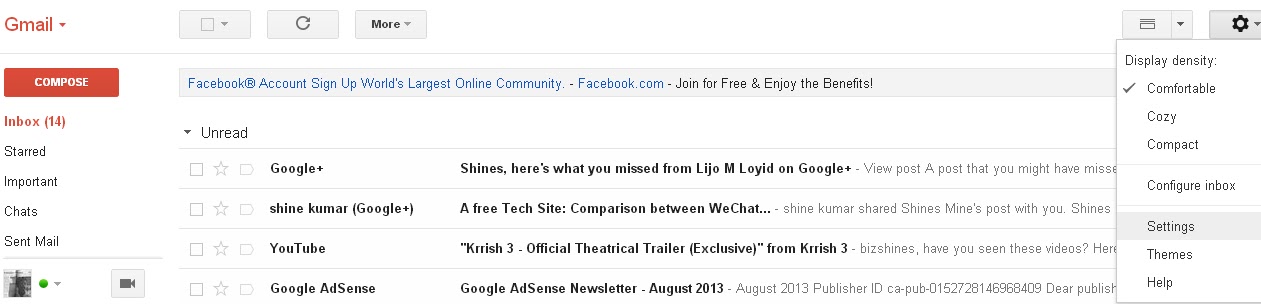
1.Go to Gear Symbol as shown in the below mentioned figure.


2.And then select Settings and then to General.
3.There you can see the options for Enable or Disable Desktop Notifications for Chat or Email. Once you Sign-out from Gmail or if you close the Chrome browser the notifications wont work.


   For any doubts you can post your question. Our team will answer for your questions shortly.

Friday, 16 August 2013

Comparison between WeChat , Line & WhatsApp

Before installing a free online messenger service, look into this chart and install.

Features
WeChat
Whats APP
Line
Live Chat
Yes
Yes
Yes
Video Call
Yes
No
No
Audio Call
Yes
No
Yes
Audio SMS
Yes
Yes
Yes
Emotions
Yes
Yes
Yes
Group Chat
Yes
Yes
Yes
Shake
Yes
No
Yes
Look Around
Yes
No
No

According to our reviews we recommend WeChat is the best one among the three.

Thursday, 11 July 2013

Remote Management Software - Comparision


The above shown chart will give you details about remote management soft-wares. And according our review Team-viewer is the better one.

The details are gathered from internet. There may be some changes in Price and features.

Wednesday, 3 July 2013

Excel - Insert, Rename or Delete a Worksheet

In Excel,

To insert a new worksheet right click on the existing worksheet and select insert as show in the below image.
In the same pop up itself you can select Delete, Copy or Rename.


Once you select Insert , a new tiny window will appear as shown in the below image. In the new window select as per your need.

In other way you can use the following commands to execute the same option.

Alt + EL      =  Delete worksheet
Alt + OHR  =  Rename Worksheet
Shift + F11  =  Insert Worksheet.

Thursday, 4 October 2012

How to setup password for MS Office Document?

In Windows MS Documents you can protect the document using passwords. You can assign password to view the document and also assign another password to modify the document.

In MS Office 2003 Version to protect the document using password:


1. Open the document which you want to protect (If already it is not opened)
2. Go to Tools - Options
3. A new screen will pop up
4. Click Security Tap
5. Now enter the password you wish to protect for viewing the document in the first box
6. If you like create password for modifying the document enter a another password in the second box
7. Finally Click on OK.  Now if you try to open the document it will ask for a password and if you try to modify the contents then also it will ask for a password

The above mentioned process is same for all type of documents like MS Word 2003, MS Excel 2003 or MS PowerPoint 2003.

For any doubts you can post your question. Our team will answer for your questions shortly

Wednesday, 3 October 2012

How to export contacts from Gmail?

In Gmail you can export your contacts and save to use that addresses in offline. For that you need to sign in to your gmail account.

Now click on to Contact menu which is shown as a drop-down menu.


Then you will be directed to a new screen where you can select what are the contacts you are going to export from your gmail account. After selecting the particular contact groups or all contacts click on to more
then export.


Now again a new screen will pop up. Here you can select which contact you would like to export and in which format you would like to export. After selecting those click on to Export. Now your contacts from Gmail account is exported and you can save that on to your local disc.


For any doubts you can post your question. Our team will answer for your questions shortly.


Tuesday, 25 September 2012

How to fix corrupted XP Files

The common methed to recover corrupted windows XP file is similar to installing a new operating system into your PC. You have to insert OS CD to your drive and start repair option and you can fix that.

But there is another easy method available.

Instructions to be followed

1. Insert the Window XP OS cd into CD/DVD Drive
2. Go to Start - Run
3. Type sfc /scannow and Press Enter

It will take less than 10 minutes to fix all corrupted XP files of your computer. Now take the OS cd from your drive and restart your computer. Now everything is repaired and started to work normally.

For any doubts you can post your question. Our team will answer for your questions shortly.

Friday, 31 August 2012

Device Manager in Windows 7

In windows 7 you can find device manager by the following steps.

Method 1: Click on Start - Control Panel - Hardware and Sound
Now you can see Device Manager under Devices and Printers. In device manager you can update or rollback  drivers and you can check or troubleshoot a device which is not working properly.

Method 2: Right click My Computer - Properties
Now a new screen will appear. On the left corner you can find the device manager. Click onto that. It will navigate you to device manager screen.

Method 3: Right click My Computer - Manage
Now on the left pane you can see the device manager, just click onto that. It will navigate you to device manager screen.

Friday, 17 February 2012

Revo Uninstaller

Revo Uninstaller is a tool which is used to remove installed programs from a computer manually under force manner. It shows the information about all installed programs, auto run manager and junk files cleaner.

Sometimes you may find difficulty in installing  or un installing an application  from a computer. At that time this tool will be very useful and works with registry. 

You can delete the installed application's leftover details  from the registry which give you access for future installation of the same application.

Most of the IT person is using this uninstaller only. You can set the start up program details with this tool. This  tool also performs as evidence remover and uncoverable deleter.


This software is very compatible with windows platforms. It can clear MS office history and internet browser history. It also supports 64 bit OS version. You can download a 30 days of trial version of Revo Uninstaller from http://www.revouninstaller.com/revo_uninstaller_uninstall_features.html

Real Player

Real Player is a free media player which plays many formats. It can play MP3, WMA, WAV, Flash, MPEG and more. By using this application you can download videos from any streaming sites or live streaming sites very easily.

For example you can download videos from YouTube and also from Justin.tv. Whatever the video is played in this player from online can be saved to desktop later.It can almost convert any type of video formats into another format including mobile and mobile devices format.

You can download this software at http://www.real.com/realplayer


Thursday, 16 February 2012

Opera Web Browser

Opera is one of the best leading web browsers among the  computer world. It works on Windows, MAC and Linux Desktops. And it also supports Mobile devices and Tablets.

It has six default add - ons. They are Opera Link, Unite, Mail, Turbo, Widjet and Extensions. It is the widely used mobile browser for mobile devices known as Opera Mini. It has released latest version for android phones.

Opera Turbo option is used to boost up your slow internet connection while browsing. This application is absolutely free to download. You can downlaod this software at http://www.opera.com/
 

Open Office - An office Pack

Open Office is an office pack which is used as a MS Office alternative. It has all the features similar to MS Office package exept outlook and access.

Open Office package is capable of accessing MS Office 2003, 2007 and 2010 documents. It is free software which can be downloaded from http://www.openoffice.org/download/index.html
Related Posts Plugin for WordPress, Blogger...