Showing posts with label Youtube. Show all posts

Friday, 4 March 2016

Watch YouTube videos without buffering - in Android

Yes, Now we can watch YouTube videos with slow internet connection speed (2G) without buffering in Android Phones. For this you need not to install any application.

* Just open the YouTube application
* Search and Select the video you want to watch


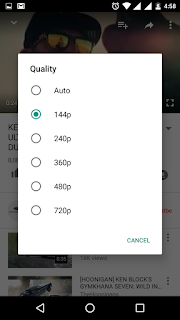
* Touch the 3 vertical dots on the right hand top corner. Now touch Quality Gear Symbol. Here you can select the Video Pixel rate. The minimum pixel (for example 144p ) plays the video without buffering. You can change the quality once get good internet speed.



Friday, 23 October 2015

What is Youtube Red ?

Youtube RED is a premium service available for paid users. The users have to pay $9.99 and for iOS users it is $12.99. Moreover Youtube RED is ad free website where users can view videos without any advertisement disturbances. And sad news it is currently not available in many countries like India.

Wednesday, 10 June 2015

How to delete Youtube watch history?

You can delete Youtube watch history either one by one or by all in a same time.
1. Open youtube

2. Click history as shown in the below image.
                                               
3.Delete the entire history by clicking Clear all watch history or one by one as shown below.


Tuesday, 25 February 2014

10 Websites to Watch movies online for free


There are lot of video sharing sites which offers free movies over internet. But it is a bit difficult to find a proper website which allows to watch movies online for free. We have searched and 5 best websites which offers free movie service over internet in various languages. 

1. Youtube - Multilingual
2. Megashare - Multilingual
3. Yify - Multilingual
4. Vimeo - Multilingual
5. Youku - Multilingual, Mandrain
6. BoxTV - Hindi - Bollywood
7. Veoh - Multilingual 
8. Hulu - Only in USA
9. Cinemastream - English
10. Dailymotion - Multilingual
11. ZeroDollar - A free movie site for YouTube by Digital Inspiration.

Please post your comments to update the list further.

Saturday, 22 February 2014

How to watch Youtube videos in slow motion and fast forward?

Finally, Youtube has implemented a feature to watch videos in slow motion and in various speed as well.
Click on the gear setting as shown in the below image then in the menu you can find “Speed” option.


In the speed option, we can find Normal ,0.25, 0.5, 1.5 & 2.

Saturday, 5 October 2013

How to Edit Videos online?


By using Youtube's default video editor we can Combine, Rotate, Trim, Add text effect, Add Music, Insert transitions & Stabilize clips.

Here is the link - Youtube Video Editor

Friday, 17 February 2012

Real Player

Real Player is a free media player which plays many formats. It can play MP3, WMA, WAV, Flash, MPEG and more. By using this application you can download videos from any streaming sites or live streaming sites very easily.

For example you can download videos from YouTube and also from Justin.tv. Whatever the video is played in this player from online can be saved to desktop later.It can almost convert any type of video formats into another format including mobile and mobile devices format.

You can download this software at http://www.real.com/realplayer


Wednesday, 15 February 2012

How to upload a video on Youtube


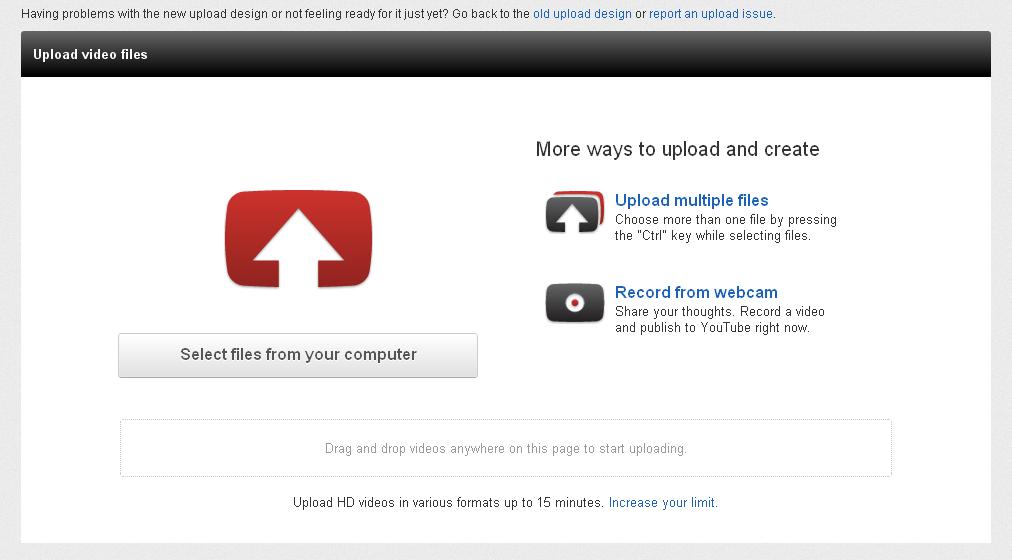
To upload a video on YouTube first you need to have a YouTube account or Google account or sign up for a new account. After you get an account you must login to YouTube's website. After you logged in you can see Browse, Movies and Upload option nearby to the search box inside YouTube's website. By clicking the upload button a screen will appear as i showed. 

There you will have options for uploading single or multiple files from your computer. Finally , Don't forget to save uploaded video and enter tags and descriptions about that video.
Related Posts Plugin for WordPress, Blogger...